---
title: Voicemail (Article)
description: Accessing and managing voicemail functions in desktop softphone.
---
[Skip to content](https://go.contivio.com/support/voicemail-1#main-content)
English
Show submenu for translations

Open main navigation
Close main navigation
- English
Show submenu for translations
-
How can we help you?
- There are no suggestions because the search field is empty.
1. [Help Guide](https://go.contivio.com/support?hsLang=en)
2. [Agent User Guide(OLD)](https://go.contivio.com/support/agent-user-guideold?hsLang=en)
3. [Inbound and Outbound Call Handling](https://go.contivio.com/support/agent-user-guideold?hsLang=en#inbound-and-outbound-call-handling)
# Voicemail (Article)
## Accessing and managing voicemail functions in desktop softphone.
**Contivio has an intuitive visual voicemail solution so you can listen to and manage your personal voicemails**
.gif?width=300&height=580&name=VM%20(1).gif)
#### Configure your voicemail greeting for direct calls:
1. Dial **\*5** or click the '**Voicemail**' icon from the *Telephony Bar*.
2. Select option **2** to set up your voicemail greeting.
3. Select option **1** to record your voicemail greeting followed by the **#** sign.
4. Listen to the playback of your recording and select **1** to keep it.
### Check Voicemail
#### Listen, save, and manage your messages through Contivio's visual voicemail:
- Click on the *Side Bar* '**Visual Voicemail**' icon
- Under **'Personal Voicemails'** you can listen to, manage, and delete personal voicemails.
**Note:** A badge on the 'Voicemail' icon from the Telephony Bar tells you how many unheard messages you have
### Listen to a queued voicemail
#### Play a recent voicemail left in the Queue or IVR:
1. Click the '**Accept**' button from the *Media Notification*.
2. Re-play, pause or stop the voicemail using the controls.
**Note:** Queued voicemails must be configured by the Administrator. If rejected, voicemails will be delivered to the next available user waiting in the queue.
**Tip:** Voice messages are saved and played as an mp3 file. Your default media player must be set up to play this file type (e.g., Windows Media Player).
### Setup Call Forwarding Rules
Call Forwarding Rules can be applied from the voicemail menu or under "Settings"
- Dial \*5 or click on the Voicemail icon in the Telephony Bar to call Voicemail.
- When at the voicemail menu, press option 3 to set up call forwarding. Listen carefully to the menu prompts to:
1. Forward 'All Calls'.
2. Forward ‘Unanswered calls'.
3. Forward 'When the phone is busy’.
4. Disable Call Forwarding
### Voicemail Drop
Upload mp3 files or record and save your own voicemail messages. Once an outbound call reaches a voicemail, select a voicemail from the list of predefined recordings. This pre-recorded message will then automatically play, allowing the agent to move on to the next call.
1. 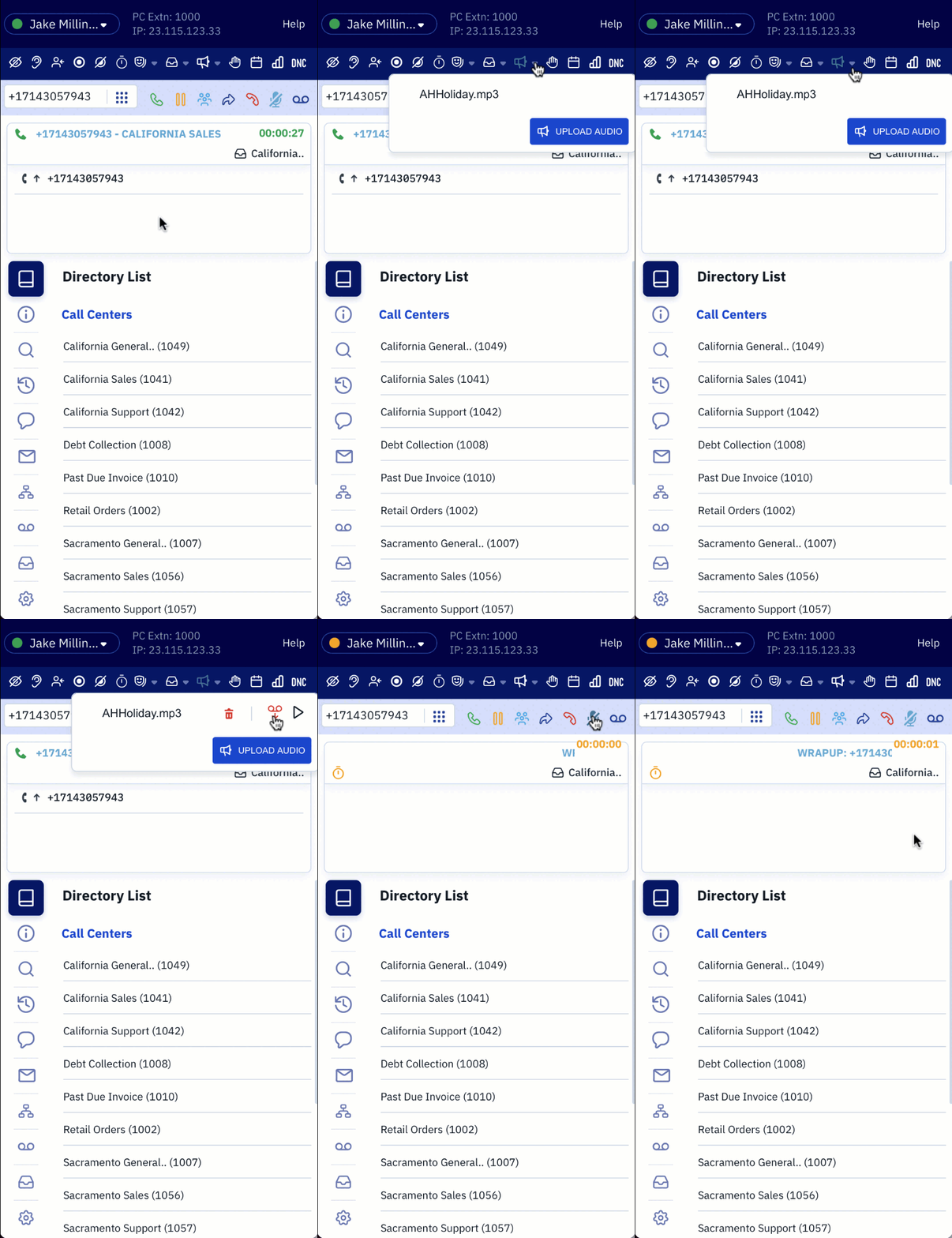Select the **'Play Audio'** Icon. 
2. To upload a pre-recorded message click the **'Upload Audio'** Icon  then select the desired prompt to upload.
3. To listen to a pre-recorded voicemail hover the mouse over the prompt and click the **'Play'** Icon. 
4. To remove a voicemal from your dropdown list hover the mouse over the prompt and click the 'Delete Audio' Icon. 
5. When you are ready to drop a voicemail hover the mouse over the desired prompt and click the **'VM Drop'** Icon. 
[Next: Live Chat](https://go.contivio.com/support/chat-1?hsLang=en)
- [Agent User Guide](https://go.contivio.com/support/agent-user-guide?hsLang=en#main-content)
- [Getting Started](https://go.contivio.com/support/agent-user-guide?hsLang=en#getting-started)
- [App Navigation](https://go.contivio.com/support/agent-user-guide?hsLang=en#app-navigation)
- [App Basics](https://go.contivio.com/support/agent-user-guide?hsLang=en#app-basics)
- [Agent Workflows](https://go.contivio.com/support/agent-user-guide?hsLang=en#agent-workflows)
- [Supervisor Workflows](https://go.contivio.com/support/agent-user-guide?hsLang=en#supervisor-workflows)
- [NetSuite Integration](https://go.contivio.com/support/agent-user-guide?hsLang=en#netsuite-integration)
- [Glossary](https://go.contivio.com/support/agent-user-guide?hsLang=en#glossary)
- [Agent User Guide(OLD)](https://go.contivio.com/support/agent-user-guideold?hsLang=en#main-content)
- [Additional Resources](https://go.contivio.com/support/agent-user-guideold?hsLang=en#additional-resources)
- [IP Phone Users](https://go.contivio.com/support/agent-user-guideold?hsLang=en#ip-phone-users)
- [Getting Started](https://go.contivio.com/support/agent-user-guideold?hsLang=en#getting-started)
- [Inbound and Outbound Call Handling](https://go.contivio.com/support/agent-user-guideold?hsLang=en#inbound-and-outbound-call-handling)
- [CRM Integrations](https://go.contivio.com/support/agent-user-guideold?hsLang=en#crm-integrations)
- [Desktop App Navigation](https://go.contivio.com/support/agent-user-guideold?hsLang=en#desktop-app-navigation)
- [Chat](https://go.contivio.com/support/agent-user-guideold?hsLang=en#chat)
- [SMS/Text](https://go.contivio.com/support/agent-user-guideold?hsLang=en#sms-text)
- [Instant Message](https://go.contivio.com/support/agent-user-guideold?hsLang=en#instant-message)
- [Fax](https://go.contivio.com/support/agent-user-guideold?hsLang=en#fax)
- [Email](https://go.contivio.com/support/agent-user-guideold?hsLang=en#email)
- [Admin Portal Help](https://go.contivio.com/support/admin-portal-help?hsLang=en#main-content)
- [Help Guide Overview](https://go.contivio.com/support/admin-portal-help?hsLang=en#help-guide-overview)
- [Portal Access](https://go.contivio.com/support/admin-portal-help?hsLang=en#portal-access)
- [People Management](https://go.contivio.com/support/admin-portal-help?hsLang=en#people-management)
- [Global Settings](https://go.contivio.com/support/admin-portal-help?hsLang=en#global-settings)
- [Contact Center Settings](https://go.contivio.com/support/admin-portal-help?hsLang=en#contact-center-settings)
- [Configuring Live Chat](https://go.contivio.com/support/admin-portal-help?hsLang=en#configuring-live-chat)
- [Analytics & Reports](https://go.contivio.com/support/admin-portal-help?hsLang=en#analytics-reports)
- [General Information](https://go.contivio.com/support/admin-portal-help?hsLang=en#general-information)
- [Contivio AI](https://go.contivio.com/support/admin-portal-help?hsLang=en#contivio-ai)
- [Dashboards and Reports](https://go.contivio.com/support/dashboards-and-reports?hsLang=en#main-content)
- [Building Reports](https://go.contivio.com/support/dashboards-and-reports?hsLang=en#building-reports)
- [Contact Search](https://go.contivio.com/support/dashboards-and-reports?hsLang=en#contact-search)
- [Supervisor Dashboard](https://go.contivio.com/support/dashboards-and-reports?hsLang=en#supervisor-dashboard)
- [Integration](https://go.contivio.com/support/integration?hsLang=en)
- [Internal Processes](https://go.contivio.com/support/internal-processes?hsLang=en)
- [Mobile App](https://go.contivio.com/support/mobile-app?hsLang=en#main-content)
- [Version Updates and Release Notes](https://go.contivio.com/support/mobile-app?hsLang=en#version-updates-and-release-notes)
- [Setting up the Contivio Mobile App](https://go.contivio.com/support/mobile-app?hsLang=en#setting-up-the-contivio-mobile-app)
- [Basic Mobile App Functionality](https://go.contivio.com/support/mobile-app?hsLang=en#basic-mobile-app-functionality)
- [IN PROGRESS](https://go.contivio.com/support/in-progress?hsLang=en)
[](https://www.contivio.com)
Copyright © 2026, Contivio