---
title: Help Requests
description: The Help Request feature allows agents to request real-time or follow-up assistance from supervisors without interrupting customer interactions. Help Requests are routed like inbound contacts and open a direct IM conversation between the agent and an available supervisor.
---
[Skip to content](https://go.contivio.com/support/help-requests#main-content)
English
Show submenu for translations

Open main navigation
Close main navigation
- English
Show submenu for translations
-
How can we help you?
- There are no suggestions because the search field is empty.
1. [Help Guide](https://go.contivio.com/support?hsLang=en)
2. [Internal Processes](https://go.contivio.com/support/internal-processes?hsLang=en)
# Help Requests
## The Help Request feature allows agents to request real-time or follow-up assistance from supervisors without interrupting customer interactions. Help Requests are routed like inbound contacts and open a direct IM conversation between the agent and an available supervisor. This guide covers setup for Admins and usage for Agents and Supervisors.
### What Is a Help Request?
A Help Request is a request-for-assistance submitted by an agent. It:
- Routes to supervisors assigned to a specific **Help Group (Queue)**
- Appears as an **email-type inbound contact**
- Opens a **live IM conversation** between agent and supervisor
- Is logged as its **own record** (separate from calls or other inbound contacts)
> **Important:** Help Requests are *not directly associated* with a call or other inbound interaction record. They are logged independently as an email-type interaction.
---
### Admin Guide: Setting Up Help Requests
Help Requests are configured at the **Inbound Queue level**, using the **Email channel**.
### Step 1: Enable Help Requests on a Queue
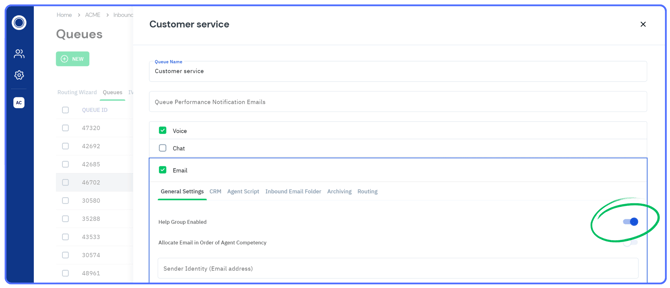
1. Navigate to **Inbound Queues**
2. Open the desired queue
3. Select the **Email** channel tab
4. Enable the toggle for **Help Group Enabled** for that queue
This designates the queue as a Help Group agents can submit requests to.
---
### Step 2: Assign Supervisors to the Help Group
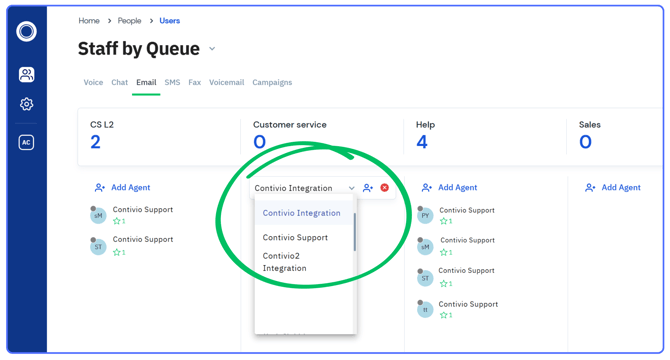
Supervisors must be assigned to the queue in order to receive Help Requests.
1. Navigate to **Staff by Queue**
2. Locate the Help Group / Queue
3. Assign supervisors or managers who should receive Help Requests
---
### Step 3: Understand How Help Requests Are Routed
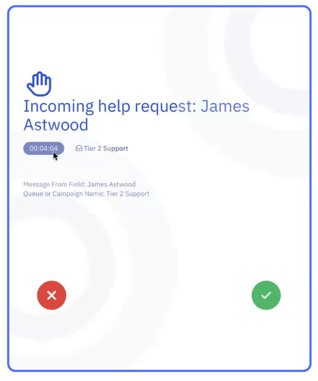
- Help Requests are offered to supervisors **just like other inbound contacts**
- Supervisors receive them as **email-type offers**
- Availability and queue assignment rules apply
---
#### Supervisor Guide: Responding to Help Requests
### Accepting a Help Request
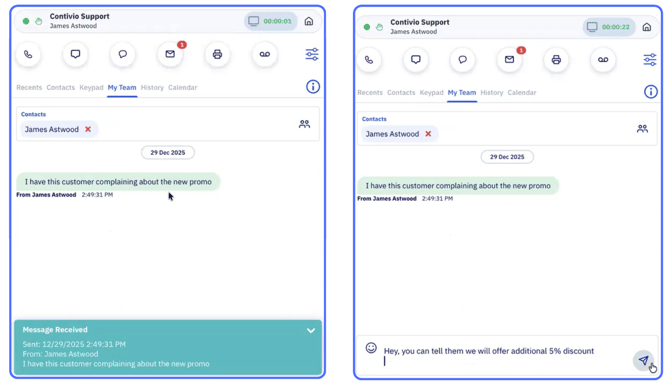
1. When a supervisor clicks **Accept** on a Help Request:
- A **live IM session** opens with the agent
- The agent’s submitted question or note appears in the conversation
---
### Managing and Ending the Help Request Session
Supervisors can continue the IM conversation with the agent to provide guidance, clarification, or next steps as needed.
During or after the conversation, supervisors can:
- Dismiss the IM from the **dropdown under the channel icon**, or
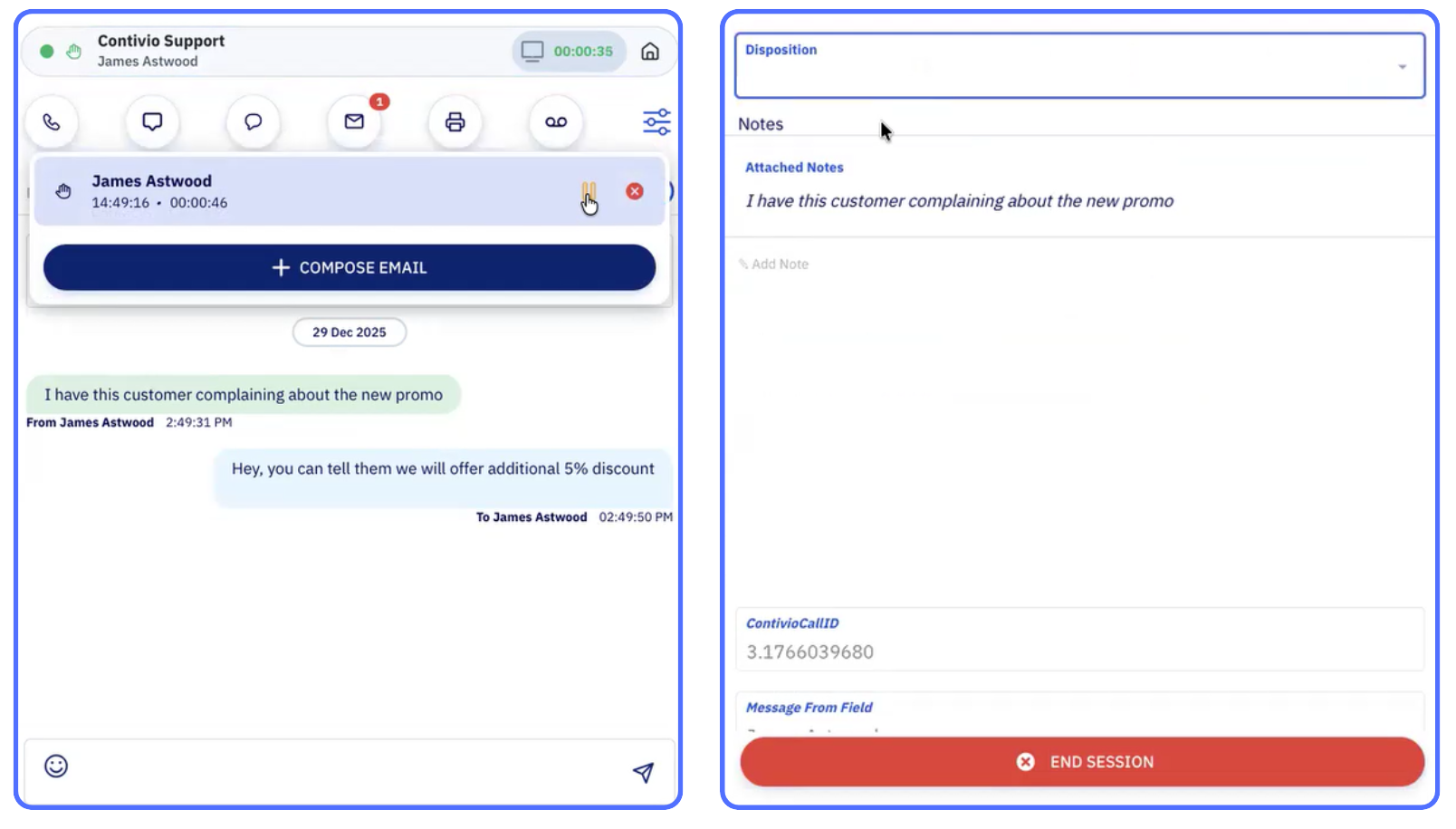
- Open the **Call / Interaction Information screen** to optionally add a disposition and formally close the session
To fully end the Help Request:
1. Open the **Call / Interaction Information screen**
2. Add a **disposition** (optional)
3. Click **End Session**
**Screenshot:**
*Interaction details screen showing disposition selection and the “End Session” option.*
---
### Agent Guide: Submitting a Help Request
### Selecting the Help Group
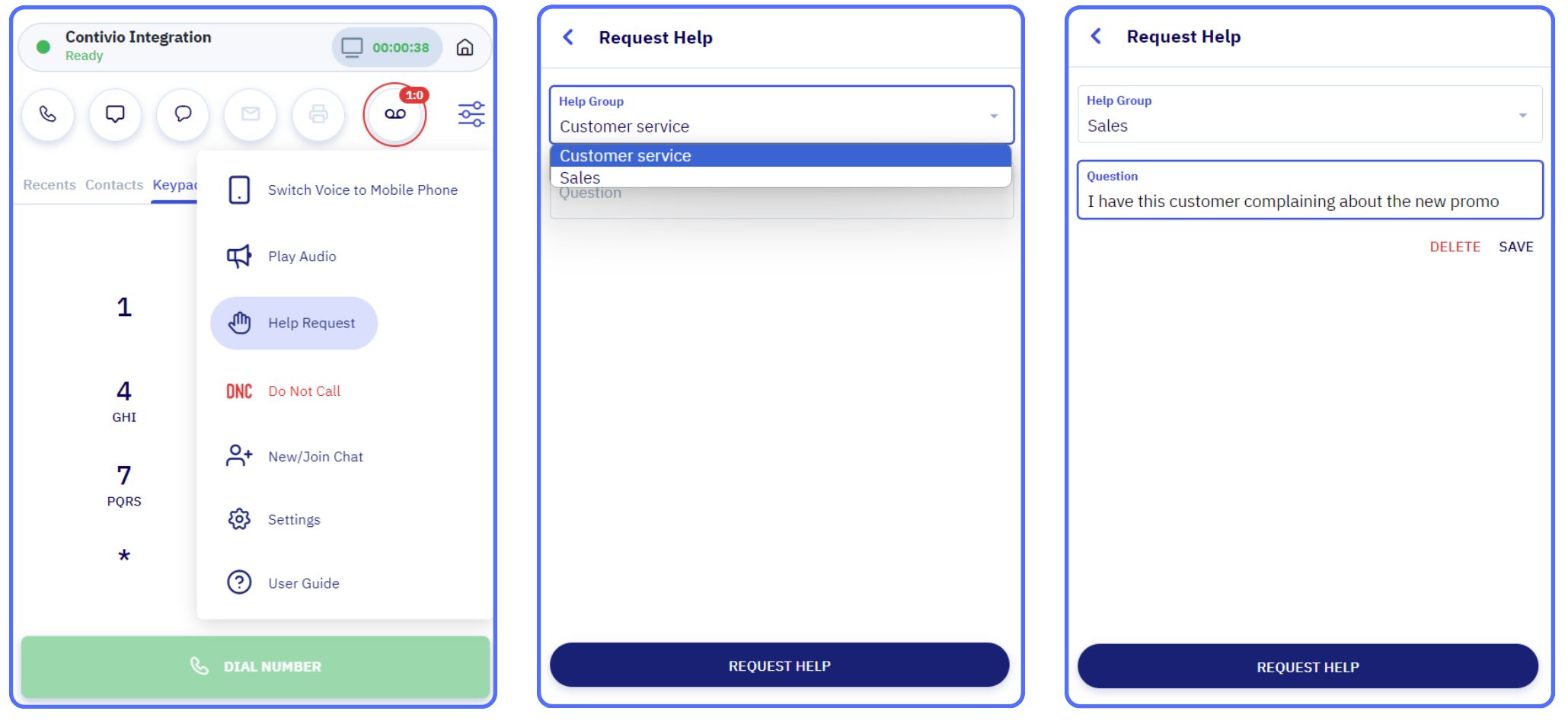
When submitting a Help Request, agents:
- Select which **Help Group / Queue** to route the request to
- Enter their question or help note
This allows agents to direct requests to the correct supervisory team.
---
### When Agents Can Submit Help Requests
Agents can submit Help Requests:
- While actively on a call
- While handling another inbound contact
- Outside of any active interaction
Help Requests do **not interrupt** the agent’s current workflow.
---
#### Best Practices
- **Admins:**
Create clear Help Groups so agents know where to route requests.
- **Agents:**
Include enough detail in the request note to help supervisors respond quickly.
- **Supervisors:**
Treat Help Requests like live inbound offers to keep response times short.
- [Agent User Guide](https://go.contivio.com/support/agent-user-guide?hsLang=en#main-content)
- [Getting Started](https://go.contivio.com/support/agent-user-guide?hsLang=en#getting-started)
- [App Navigation](https://go.contivio.com/support/agent-user-guide?hsLang=en#app-navigation)
- [App Basics](https://go.contivio.com/support/agent-user-guide?hsLang=en#app-basics)
- [Agent Workflows](https://go.contivio.com/support/agent-user-guide?hsLang=en#agent-workflows)
- [Supervisor Workflows](https://go.contivio.com/support/agent-user-guide?hsLang=en#supervisor-workflows)
- [NetSuite Integration](https://go.contivio.com/support/agent-user-guide?hsLang=en#netsuite-integration)
- [Glossary](https://go.contivio.com/support/agent-user-guide?hsLang=en#glossary)
- [Agent User Guide(OLD)](https://go.contivio.com/support/agent-user-guideold?hsLang=en#main-content)
- [Additional Resources](https://go.contivio.com/support/agent-user-guideold?hsLang=en#additional-resources)
- [IP Phone Users](https://go.contivio.com/support/agent-user-guideold?hsLang=en#ip-phone-users)
- [Getting Started](https://go.contivio.com/support/agent-user-guideold?hsLang=en#getting-started)
- [Inbound and Outbound Call Handling](https://go.contivio.com/support/agent-user-guideold?hsLang=en#inbound-and-outbound-call-handling)
- [CRM Integrations](https://go.contivio.com/support/agent-user-guideold?hsLang=en#crm-integrations)
- [Desktop App Navigation](https://go.contivio.com/support/agent-user-guideold?hsLang=en#desktop-app-navigation)
- [Chat](https://go.contivio.com/support/agent-user-guideold?hsLang=en#chat)
- [SMS/Text](https://go.contivio.com/support/agent-user-guideold?hsLang=en#sms-text)
- [Instant Message](https://go.contivio.com/support/agent-user-guideold?hsLang=en#instant-message)
- [Fax](https://go.contivio.com/support/agent-user-guideold?hsLang=en#fax)
- [Email](https://go.contivio.com/support/agent-user-guideold?hsLang=en#email)
- [Admin Portal Help](https://go.contivio.com/support/admin-portal-help?hsLang=en#main-content)
- [Help Guide Overview](https://go.contivio.com/support/admin-portal-help?hsLang=en#help-guide-overview)
- [Portal Access](https://go.contivio.com/support/admin-portal-help?hsLang=en#portal-access)
- [People Management](https://go.contivio.com/support/admin-portal-help?hsLang=en#people-management)
- [Global Settings](https://go.contivio.com/support/admin-portal-help?hsLang=en#global-settings)
- [Contact Center Settings](https://go.contivio.com/support/admin-portal-help?hsLang=en#contact-center-settings)
- [Configuring Live Chat](https://go.contivio.com/support/admin-portal-help?hsLang=en#configuring-live-chat)
- [Analytics & Reports](https://go.contivio.com/support/admin-portal-help?hsLang=en#analytics-reports)
- [General Information](https://go.contivio.com/support/admin-portal-help?hsLang=en#general-information)
- [Contivio AI](https://go.contivio.com/support/admin-portal-help?hsLang=en#contivio-ai)
- [Dashboards and Reports](https://go.contivio.com/support/dashboards-and-reports?hsLang=en#main-content)
- [Building Reports](https://go.contivio.com/support/dashboards-and-reports?hsLang=en#building-reports)
- [Contact Search](https://go.contivio.com/support/dashboards-and-reports?hsLang=en#contact-search)
- [Supervisor Dashboard](https://go.contivio.com/support/dashboards-and-reports?hsLang=en#supervisor-dashboard)
- [Integration](https://go.contivio.com/support/integration?hsLang=en)
- [Internal Processes](https://go.contivio.com/support/internal-processes?hsLang=en)
- [Mobile App](https://go.contivio.com/support/mobile-app?hsLang=en#main-content)
- [Version Updates and Release Notes](https://go.contivio.com/support/mobile-app?hsLang=en#version-updates-and-release-notes)
- [Setting up the Contivio Mobile App](https://go.contivio.com/support/mobile-app?hsLang=en#setting-up-the-contivio-mobile-app)
- [Basic Mobile App Functionality](https://go.contivio.com/support/mobile-app?hsLang=en#basic-mobile-app-functionality)
- [IN PROGRESS](https://go.contivio.com/support/in-progress?hsLang=en)
[](https://www.contivio.com)
Copyright © 2026, Contivio