---
title: Agent Status and Utilization
description: "This report shows you what your agents are working on and what their status is in real time. It contains two tables: a summary table and agent status table. The summary table can be hidden if required"
---
[Skip to content](https://go.contivio.com/support/agent-statistics#main-content)
English
Show submenu for translations

Open main navigation
Close main navigation
- English
Show submenu for translations
-
How can we help you?
- There are no suggestions because the search field is empty.
1. [Help Guide](https://go.contivio.com/support?hsLang=en)
2. [Dashboards and Reports](https://go.contivio.com/support/dashboards-and-reports?hsLang=en)
3. [Supervisor Dashboard](https://go.contivio.com/support/dashboards-and-reports?hsLang=en#supervisor-dashboard)
# Agent Status and Utilization
This report shows you what your agents are working on and what their status is in real time. It contains two tables: a summary table and agent status table. The summary table can be hidden if required via collapse button at top right of the chart
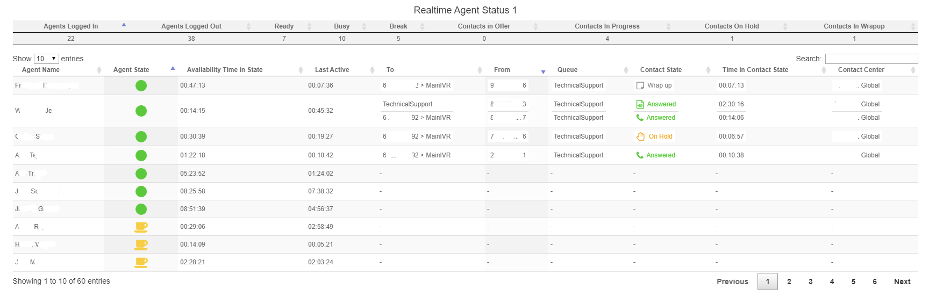
- Agent Name: sortable alphabetically, or the search bar can be utilized to see the data for a specific agent.
- Agent State: each agent’s status. A green dot indicates that the agent is ready and available to accept calls/media. A red dot indicates that the agent’s status is set to busy, and they are unable to accept calls/media. A yellow coffee cup icon indicates that the agent is on a break and cannot accept calls/media.
- Availability time in state: this shows the amount of time they have been in their state (HH:MM:SS).
- Last Active: shows how much time has elapsed since the agent was last handling a customer interaction.
- To: shows the number that was dialed. Inbound calls will show either the agent’s direct line or the IVR number. Outbound calls will show the number that the agent dialed.
- From: shows the number or agent that dialed the “To” number.
- Queue: represents the queue that the agent belongs to, or the queue that was originally selected by the customer.
- Contact State: shows the result of the current call or media. “Answered” indicates that the agent (inbound) or customer (outbound) answered. “Wrap up” indicates that the agent’s call is in a wrap up period.
- Time in Contact State: shows the amount of time the agent has been in their current state.
- Contact Center: displays which Contact Center the agent belongs to.
- [Agent User Guide](https://go.contivio.com/support/agent-user-guide?hsLang=en#main-content)
- [Getting Started](https://go.contivio.com/support/agent-user-guide?hsLang=en#getting-started)
- [App Navigation](https://go.contivio.com/support/agent-user-guide?hsLang=en#app-navigation)
- [App Basics](https://go.contivio.com/support/agent-user-guide?hsLang=en#app-basics)
- [Agent Workflows](https://go.contivio.com/support/agent-user-guide?hsLang=en#agent-workflows)
- [Supervisor Workflows](https://go.contivio.com/support/agent-user-guide?hsLang=en#supervisor-workflows)
- [NetSuite Integration](https://go.contivio.com/support/agent-user-guide?hsLang=en#netsuite-integration)
- [Glossary](https://go.contivio.com/support/agent-user-guide?hsLang=en#glossary)
- [Agent User Guide(OLD)](https://go.contivio.com/support/agent-user-guideold?hsLang=en#main-content)
- [Additional Resources](https://go.contivio.com/support/agent-user-guideold?hsLang=en#additional-resources)
- [IP Phone Users](https://go.contivio.com/support/agent-user-guideold?hsLang=en#ip-phone-users)
- [Getting Started](https://go.contivio.com/support/agent-user-guideold?hsLang=en#getting-started)
- [Inbound and Outbound Call Handling](https://go.contivio.com/support/agent-user-guideold?hsLang=en#inbound-and-outbound-call-handling)
- [CRM Integrations](https://go.contivio.com/support/agent-user-guideold?hsLang=en#crm-integrations)
- [Desktop App Navigation](https://go.contivio.com/support/agent-user-guideold?hsLang=en#desktop-app-navigation)
- [Chat](https://go.contivio.com/support/agent-user-guideold?hsLang=en#chat)
- [SMS/Text](https://go.contivio.com/support/agent-user-guideold?hsLang=en#sms-text)
- [Instant Message](https://go.contivio.com/support/agent-user-guideold?hsLang=en#instant-message)
- [Fax](https://go.contivio.com/support/agent-user-guideold?hsLang=en#fax)
- [Email](https://go.contivio.com/support/agent-user-guideold?hsLang=en#email)
- [Admin Portal Help](https://go.contivio.com/support/admin-portal-help?hsLang=en#main-content)
- [Help Guide Overview](https://go.contivio.com/support/admin-portal-help?hsLang=en#help-guide-overview)
- [Portal Access](https://go.contivio.com/support/admin-portal-help?hsLang=en#portal-access)
- [People Management](https://go.contivio.com/support/admin-portal-help?hsLang=en#people-management)
- [Global Settings](https://go.contivio.com/support/admin-portal-help?hsLang=en#global-settings)
- [Contact Center Settings](https://go.contivio.com/support/admin-portal-help?hsLang=en#contact-center-settings)
- [Configuring Live Chat](https://go.contivio.com/support/admin-portal-help?hsLang=en#configuring-live-chat)
- [Analytics & Reports](https://go.contivio.com/support/admin-portal-help?hsLang=en#analytics-reports)
- [General Information](https://go.contivio.com/support/admin-portal-help?hsLang=en#general-information)
- [Contivio AI](https://go.contivio.com/support/admin-portal-help?hsLang=en#contivio-ai)
- [Dashboards and Reports](https://go.contivio.com/support/dashboards-and-reports?hsLang=en#main-content)
- [Building Reports](https://go.contivio.com/support/dashboards-and-reports?hsLang=en#building-reports)
- [Contact Search](https://go.contivio.com/support/dashboards-and-reports?hsLang=en#contact-search)
- [Supervisor Dashboard](https://go.contivio.com/support/dashboards-and-reports?hsLang=en#supervisor-dashboard)
- [Integration](https://go.contivio.com/support/integration?hsLang=en)
- [Internal Processes](https://go.contivio.com/support/internal-processes?hsLang=en)
- [Mobile App](https://go.contivio.com/support/mobile-app?hsLang=en#main-content)
- [Version Updates and Release Notes](https://go.contivio.com/support/mobile-app?hsLang=en#version-updates-and-release-notes)
- [Setting up the Contivio Mobile App](https://go.contivio.com/support/mobile-app?hsLang=en#setting-up-the-contivio-mobile-app)
- [Basic Mobile App Functionality](https://go.contivio.com/support/mobile-app?hsLang=en#basic-mobile-app-functionality)
- [IN PROGRESS](https://go.contivio.com/support/in-progress?hsLang=en)
[](https://www.contivio.com)
Copyright © 2026, Contivio