---
title: Clearing a Session and Ending Wrap-Up
description: Learn how to properly end wrap-up and clear a session after a call. This article explains how to disconnect the call, enter dispositions and notes, end wrap-up, and close the session. It also covers common issues that prevent wrap-up from ending, including active calls that have not been disconnected.
---
[Skip to content](https://go.contivio.com/support/-clearing-a-session-and-ending-wrap-up#main-content)
English
Show submenu for translations

Open main navigation
Close main navigation
- English
Show submenu for translations
-
How can we help you?
- There are no suggestions because the search field is empty.
1. [Help Guide](https://go.contivio.com/support?hsLang=en)
2. [IN PROGRESS](https://go.contivio.com/support/in-progress?hsLang=en)
# Clearing a Session and Ending Wrap-Up
## Learn how to properly end wrap-up and clear a session after a call. This article explains how to disconnect the call, enter dispositions and notes, end wrap-up, and close the session. It also covers common issues that prevent wrap-up from ending, including active calls that have not been disconnected.
Important:Before you can end wrap-up or clear a session, the call must be disconnected.
If you are still connected to the call, the **END WRAP-UP** button will not be available. First click **Hang Up**, then complete any dispositioning or notes, and finally end the session.
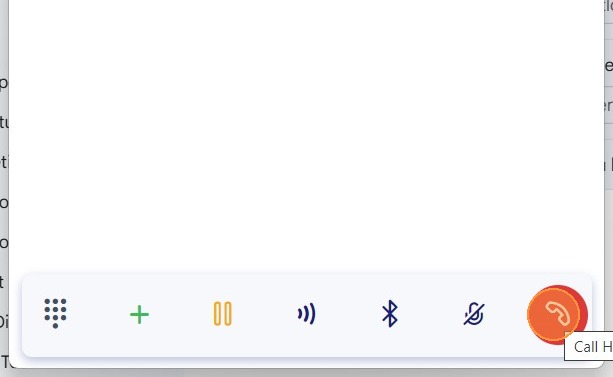
### 1. End the Call
Click **Hang Up** to disconnect the call.
**
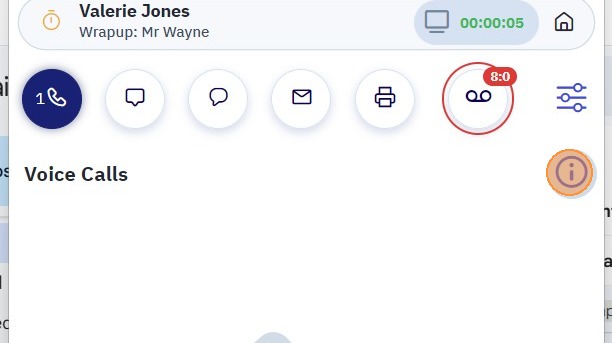
### 2. (Optional) Add Disposition and Notes
Click the **Session Information** icon.

Select a **Disposition** from the dropdown menu and enter any notes as needed.
**
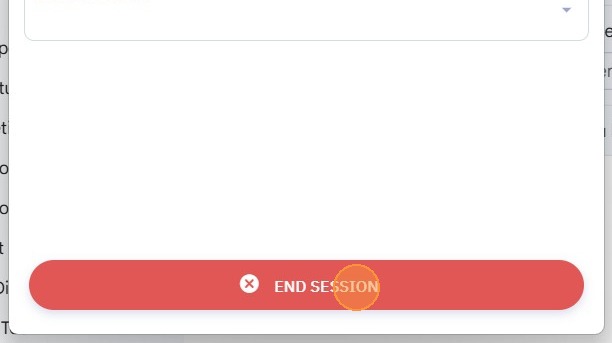
### 3. End Wrap-Up
Once the call has ended, click **END WRAP-UP** at the bottom of the application.
### **If You Cannot End Wrap-Up**
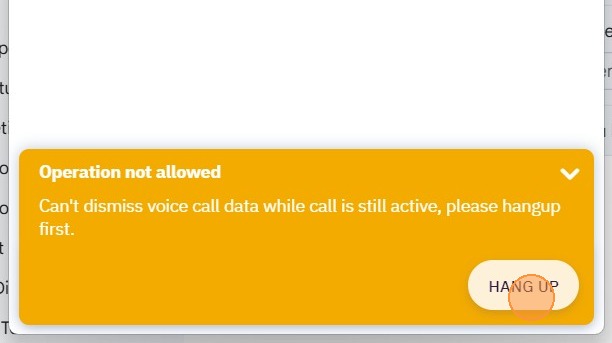
If the **END WRAP-UP** button is unavailable, verify that the call has been disconnected.
1. Open **Session Information**.
2. If a warning indicates the call is still active, click **HANG UP**.
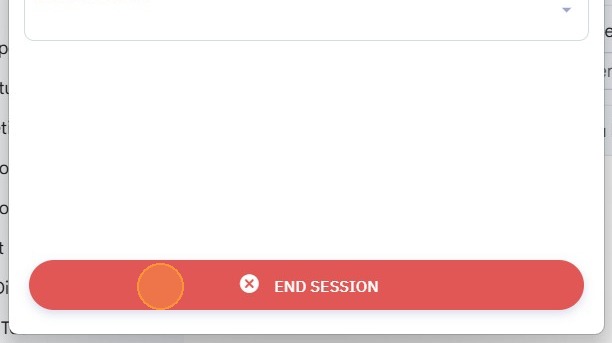
3. Click **END WRAP-UP**.
4. Click **END SESSION**
- [Agent User Guide](https://go.contivio.com/support/agent-user-guide?hsLang=en#main-content)
- [Getting Started](https://go.contivio.com/support/agent-user-guide?hsLang=en#getting-started)
- [App Navigation](https://go.contivio.com/support/agent-user-guide?hsLang=en#app-navigation)
- [App Basics](https://go.contivio.com/support/agent-user-guide?hsLang=en#app-basics)
- [Agent Workflows](https://go.contivio.com/support/agent-user-guide?hsLang=en#agent-workflows)
- [Supervisor Workflows](https://go.contivio.com/support/agent-user-guide?hsLang=en#supervisor-workflows)
- [NetSuite Integration](https://go.contivio.com/support/agent-user-guide?hsLang=en#netsuite-integration)
- [Glossary](https://go.contivio.com/support/agent-user-guide?hsLang=en#glossary)
- [Agent User Guide(OLD)](https://go.contivio.com/support/agent-user-guideold?hsLang=en#main-content)
- [Additional Resources](https://go.contivio.com/support/agent-user-guideold?hsLang=en#additional-resources)
- [IP Phone Users](https://go.contivio.com/support/agent-user-guideold?hsLang=en#ip-phone-users)
- [Getting Started](https://go.contivio.com/support/agent-user-guideold?hsLang=en#getting-started)
- [Inbound and Outbound Call Handling](https://go.contivio.com/support/agent-user-guideold?hsLang=en#inbound-and-outbound-call-handling)
- [CRM Integrations](https://go.contivio.com/support/agent-user-guideold?hsLang=en#crm-integrations)
- [Desktop App Navigation](https://go.contivio.com/support/agent-user-guideold?hsLang=en#desktop-app-navigation)
- [Chat](https://go.contivio.com/support/agent-user-guideold?hsLang=en#chat)
- [SMS/Text](https://go.contivio.com/support/agent-user-guideold?hsLang=en#sms-text)
- [Instant Message](https://go.contivio.com/support/agent-user-guideold?hsLang=en#instant-message)
- [Fax](https://go.contivio.com/support/agent-user-guideold?hsLang=en#fax)
- [Email](https://go.contivio.com/support/agent-user-guideold?hsLang=en#email)
- [Admin Portal Help](https://go.contivio.com/support/admin-portal-help?hsLang=en#main-content)
- [Help Guide Overview](https://go.contivio.com/support/admin-portal-help?hsLang=en#help-guide-overview)
- [Portal Access](https://go.contivio.com/support/admin-portal-help?hsLang=en#portal-access)
- [People Management](https://go.contivio.com/support/admin-portal-help?hsLang=en#people-management)
- [Global Settings](https://go.contivio.com/support/admin-portal-help?hsLang=en#global-settings)
- [Contact Center Settings](https://go.contivio.com/support/admin-portal-help?hsLang=en#contact-center-settings)
- [Configuring Live Chat](https://go.contivio.com/support/admin-portal-help?hsLang=en#configuring-live-chat)
- [Analytics & Reports](https://go.contivio.com/support/admin-portal-help?hsLang=en#analytics-reports)
- [General Information](https://go.contivio.com/support/admin-portal-help?hsLang=en#general-information)
- [Contivio AI](https://go.contivio.com/support/admin-portal-help?hsLang=en#contivio-ai)
- [Dashboards and Reports](https://go.contivio.com/support/dashboards-and-reports?hsLang=en#main-content)
- [Building Reports](https://go.contivio.com/support/dashboards-and-reports?hsLang=en#building-reports)
- [Contact Search](https://go.contivio.com/support/dashboards-and-reports?hsLang=en#contact-search)
- [Supervisor Dashboard](https://go.contivio.com/support/dashboards-and-reports?hsLang=en#supervisor-dashboard)
- [Integration](https://go.contivio.com/support/integration?hsLang=en)
- [Internal Processes](https://go.contivio.com/support/internal-processes?hsLang=en)
- [Mobile App](https://go.contivio.com/support/mobile-app?hsLang=en#main-content)
- [Version Updates and Release Notes](https://go.contivio.com/support/mobile-app?hsLang=en#version-updates-and-release-notes)
- [Setting up the Contivio Mobile App](https://go.contivio.com/support/mobile-app?hsLang=en#setting-up-the-contivio-mobile-app)
- [Basic Mobile App Functionality](https://go.contivio.com/support/mobile-app?hsLang=en#basic-mobile-app-functionality)
- [IN PROGRESS](https://go.contivio.com/support/in-progress?hsLang=en)
[](https://www.contivio.com)
Copyright © 2026, Contivio